

Binho Supernova: Hardware Reference
Ports and power domains, electrical ratings, target voltage, pinout and status LEDs of the Binho Supernova.
Ports and Power Domains
Section titled “Ports and Power Domains”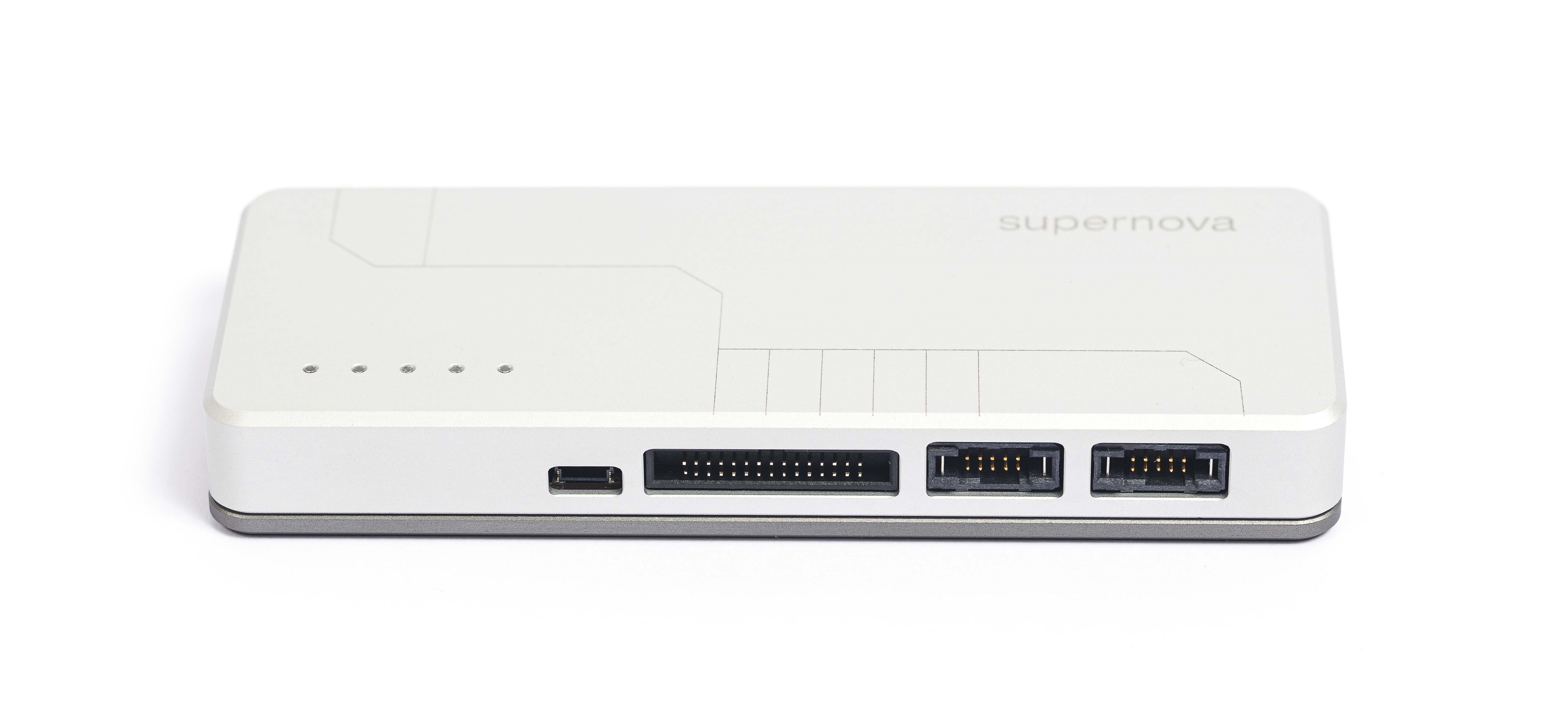
Supernova's ports
The Supernova connects to the computer over USB-C (USB 2.0 Full Speed, 12 Mbps), which also powers it. It enumerates as a USB HID device plus a USB CDC virtual COM port, so no driver install is needed. On Linux, add a one-time USB permission rule: see Solving USB Connection Issues on Linux.
The front has four ports on three power domains. The two I3C ports cannot be used at the same time:
| Port | Connector | Signals | Power domain | Voltage |
|---|---|---|---|---|
| I3C High Voltage (HV) | 2x5 TigerEye | I3C, legacy I2C, SMBus | I3C HV | 1.2 V to 3.3 V |
| I3C Low Voltage (LV) | 2x5 TigerEye | I3C, legacy I2C | I3C LV | 0.8 V to 1.2 V |
| Multifunction | 2x15, 1.27 mm IDC | I2C, SPI, UART, GPIO | Multifunction | 1.2 V to 3.3 V |
| Dedicated I2C | 4-pin JST SH (Qwiic) | I2C (same bus as the Multifunction port) | Multifunction | 1.2 V to 3.3 V |
- Only one I3C port is active at a time. In PyCosmicSDK the voltage that is set picks the port: 800 to 1199 mV drives the LV port, 1200 to 3300 mV the HV port.
- The active I3C port and the Multifunction domain are set independently. A 1.0 V I3C bus can run next to a 1.8 V SPI bus. I2C, SPI, UART and GPIO share the Multifunction domain, so they always run at the same voltage.
- All domains share one ground, which is also the host PC’s USB ground.
- Each domain’s target voltage (VTARG) pin either outputs power to an unpowered target, or acts as the logic-level reference for a self-powered target.
Electrical Ratings
Section titled “Electrical Ratings”From the datasheet, recommended operating conditions:
| Domain | Voltage (in or out) | Output current, typ / max |
|---|---|---|
| I3C HV | 1.2 V to 3.3 V | 100 / 200 mA |
| I3C LV | 0.8 V to 1.2 V | 100 / 350 mA |
| Multifunction | 1.2 V to 3.3 V | 100 / 200 mA |
USB input: 4.5 V to 5.5 V, 500 mA typical. Operating temperature 0 °C to 70 °C. ESD rating ±4 kV.
Target Voltage (VTARG)
Section titled “Target Voltage (VTARG)”Set each rail from Mission Control 3 or the SDKs before bringing a bus up, so pull-ups and level shifters match the target. Firmware behaviour to know:
- Self-powered targets. Use the SDK’s
use_external_voltage()(or the equivalent in Mission Control 3) so the adapter follows the target’s VTARG instead of driving it. Setting a voltage on a port the target already powers returns an error and leaves the adapter’s supply off. See Target Voltage. - Rail off. Setting the Multifunction rail to 0 V also stops the SPI, UART and GPIO pins from driving and disconnects the I2C pull-ups, so an unpowered target is not fed through its I/O.
- I3C HV accuracy. The HV rail is trimmed closed-loop: measured within -7 mV to +2 mV across 1200 to 3250 mV. A set takes about 550 ms.
Pinout Guide
Section titled “Pinout Guide”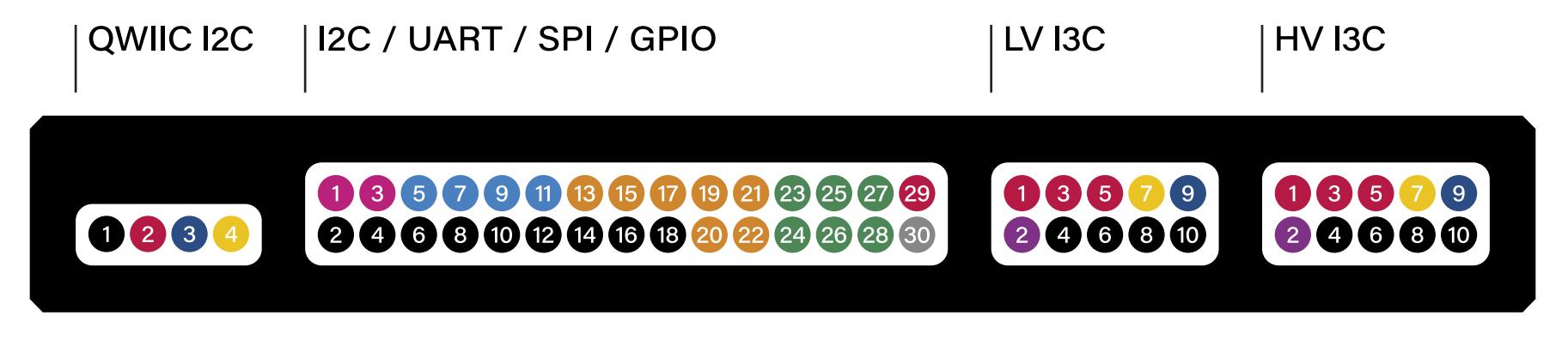
Dedicated I2C Port (Qwiic)
Section titled “Dedicated I2C Port (Qwiic)”| 1 - GND | 2 - VTARG | 3 - SDA | 4 - SCL |
|---|
Multifunction Port (I2C / UART / SPI / GPIO)
Section titled “Multifunction Port (I2C / UART / SPI / GPIO)”Even pins 2 to 18 are GND.
| Pin | Signal | Pin | Signal |
|---|---|---|---|
| 1 | I2C SCL | 3 | I2C SDA |
| 5 | UART RX | 7 | UART TX |
| 9 | UART RTS | 11 | UART CTS |
| 13 | SPI MOSI (SDO) | 15 | SPI MISO (SDI) |
| 17 | SPI CLK | 19 | SPI CS0 |
| 20 | SPI CS1 | 21 | SPI CS2 |
| 22 | SPI CS3 | 23 | GPIO 1 |
| 24 | GPIO 2 | 25 | GPIO 3 |
| 26 | GPIO 4 | 27 | GPIO 5 |
| 28 | GPIO 6 | 29 | VTARG |
| 30 | Not connected (reserved) |
I3C Ports (LV and HV, Same Pinout)
Section titled “I3C Ports (LV and HV, Same Pinout)”| 1 - VTARG | 2 - DETECT | 3 - VTARG | 4 - GND |
|---|---|---|---|
| 5 - VTARG | 6 - GND | 7 - SCL | 8 - GND |
| 9 - SDA | 10 - GND |
DETECT identifies the plugged-in harness (the I3C harness or the Qwiic adapter board). Do not connect it to the circuit.
Status LEDs
Section titled “Status LEDs”The Supernova has 5 RGB LEDs.
- Idle: the LEDs cycle between green and blue.
- Command received: the cycle pauses for 30 seconds.
- Fourth LED: lights when the Supernova receives a USB message.
- Fifth LED: lights when it sends a response to the host.